| Area | SAP BusinessObjects (SAP BO) | Power BI |
|---|---|---|
| Architecture & Deployment | On-premises mostly, which demands specific infrastructure, upgrades, and maintenance. Scaling often needs additional hardware and planning. | A platform based on the cloud with the least infrastructure. Scales effortlessly without human intervention and with quicker deployment. |
| Ease of Use | Mostly IT-driven. Because it has complex structures, business users rely on IT teams to create and modify reports. | Designed for business users. The user-friendly interface enables users to build, edit, and analyze reports without assistance. |
| Reporting Style | Focused on static, formatted reports that are difficult to explore or modify on the fly. | User interactive dashboards that have drilldowns, filters, and real-time exploration. |
| Self-Service Analytics | Limited self-service capabilities. Extensive reliance on IT to make changes and bring new insights. | Powerful self-service analytics that allow users to pose questions and get immediate answers. |
| Performance & Data Refresh | Scheduled refresh cycles are effective only for large datasets. | Enables more frequent refresh intervals and a real-time view of data with current data systems. |
| Data Source Integration | Its performance is optimized in SAP-based environments; non-SAP sources must be integrated with additional efforts. | Integrates readily with numerous SAP and non-SAP data sources, cloud applications, and APIs. |
| Scalability | The scaling of users or data includes the cost of infrastructure planning and operations. | Scales well without intensive infrastructure planning. |
| Cost Model | Increased licensing, infrastructure, and maintenance require specialized skills. | Lower total cost of ownership, subscription-based pricing. |
| Governance & Security | Powerful and centralized rule, yet difficult to adjust. | Mixed leadership with elasticity- IT ensures security, and users can investigate data at their own will. |
| Modern BI Capabilities | Limited support in contemporary analytics and teamwork. | Developed to support contemporary BI through teamwork, cloud computing, and sustained innovation. |


Loading...
Why Enterprises Are Moving to SAP BO to Power BI Migration
Posted
January 9, 2026
Category BI
Business intelligence in the enterprise is no longer merely about creating a pile of stagnant reports; it is about speed, flexibility, and real insights that teams can act on instantly. In the modern competitive environment, self-service analytics and real-time data are no longer a luxury but a necessity. In industry research, 84% of executives report that BI and analytics are a key component of their digital transformation efforts, and self-service BI adoption has risen by more than 30% annually as business units demand greater IT independence.
Meanwhile, BI tools are everywhere in businesses. According to a recent report on the BI industry, more than 65% of organizations have adopted cloud-based BI solutions, and almost two-thirds of business BI consumers use real-time analytics to make real-time operational decisions.
However, there is a twist here: conventional BI systems, such as SAP BusinessObjects, were built when the norm was static reporting and IT-driven dashboards. These legacy systems may not support the growing demand for interactive dashboards, real-time insights, and simplified self-service access for non-technical users. This has led most businesses to reconsider their BI stacks and consider more agile, cloud-native offerings.
This shift in expectations is one of the main reasons businesses are adopting Power BI, a business analytics tool that is faster, more collaborative, and more user-friendly, as an alternative to SAP BO. It could be a need to reduce dependence on IT departments or to make data accessible to all users. Power BI is quickly gaining popularity among organizations that require BI that better aligns with how business users work.
Let’s see why businesses are choosing to go with SAP BO to Power BI Migration.
SAP BO: Once a Strong BI Platform, Now a Limitation
It helped businesses standardize reporting, enforce governance, and manage data at scale, particularly in SAP-centric environments. It helped businesses standardize reporting, manage governance, and handle structured data at scale, particularly in SAP-based environments.
However, its usage in business has transformed.
What used to be a good fit in an IT-based reporting model is now slow and limiting. The business teams want speed, not long wait times for new reports or small adjustments. With increasing expectations, SAP BO started to demonstrate evident limitations:
- Intensive reliance on IT departments to develop reports and update them.
- Design of a complex universe that is hard to maintain.
- Delays in the development and deployment cycles.
- Static, report-centric analytics with limited interactivity
For business users, this may mean relying on outdated reports or using Excel to export data. For IT teams, this is a constant maintenance task and a growing backlog. Such delays are a direct cause of agility in fast-moving environments. Agility is hindered when insights are slow to be acted on.
Consequently, SAP BO is now perceived by many enterprises as a legacy system that, while stable for traditional reporting, lacks the flexibility and scalability required to meet today’s evolving business intelligence demands.
Changing Business Intelligence Needs of Modern Enterprises
The world of modern enterprises is fast-paced, with data volumes increasing faster than ever; sources are more diverse than ever, and decisions cannot be postponed. The teams are expected to respond to market dynamics, customer actions, and operational challenges in real time, and they need BI systems that are fast and flexible, especially when organizations are planning initiatives such as SAP BusinessObjects semantic layer migrations as part of their analytics modernization journey.
Today’s BI demands go beyond conventional reporting. Enterprises now look for:
- Self-validation analytics enables business users to explore data without technical assistance.
- Interactive dashboards with more insights rather than fixed, static reports.
- Real-time data updates to enable timely and assured decision-making.
- Cloud and mobile access insight is available wherever and whenever.
- Simple access to other sources of data, including non-SAP data.
Business users no longer want to rely on IT to deliver each new report, filter, or data change. They want to be free to ask follow-up questions, dig deeper into trends, and receive answers in real time, while IT teams focus on data governance and performance rather than handling routine report requests.
BI systems of the past may not be able to achieve this degree of agility and self-service. This is why numerous enterprises are reconsidering their BI strategies and moving toward modern analytics systems built around how people actually work today.
Key Reasons Enterprises Are Moving from SAP BO to Power BI
Businesses are not moving away from SAP BO because a more modern BI tool is not available. The shift is typically driven by everyday problems, such as delayed reporting, excessive reliance on IT, escalating expenses, and the need for faster information. Power BI can address these pain points in a way that better aligns with how modern teams operate. If organizations are facing these challenges, it is often the right time to consider business intelligence transformation services to modernize their BI environment and improve decision-making.
Here are the key reasons enterprises are migrating from SAP BO to Power BI.
1. Lower Total Cost of Ownership
SAP BO is usually associated with high licensing, infrastructure, and maintenance fees. Conversely, Power BI offers a lower-cost, more predictable pricing model. Businesses can reduce overhead and access powerful analytics without operating complex on-premises systems.
2. Self-Service Analytics for Business Users
Through Power BI, businesspeople do not require IT to provide all reports or minor modifications. They can build dashboards, filter data, and interact with it independently. This not only accelerates the decision-making process but also enables IT teams to focus on more strategic work.
3. Faster Deployment and Easy Scalability
Power BI is cloud-based. This allows businesses to deploy it more quickly, migrate users faster, and scale as data volumes increase without extensive setup or infrastructure planning.
4. More Interactive and Visual Insights
Power BI offers interactive dashboards, unlike the static SAP BO reports. It is easy to understand what is happening and take prompt action, as the user can drill down into the data, see trends, and view insights visually.
5. Works Naturally with Microsoft Tools
Many enterprises already use Microsoft tools like Excel, Teams, and SharePoint. Power BI datasets can be easily integrated into this ecosystem, enabling insights to be shared, collaborated on, and used in daily workflows. When an organization migrates from SAP BO to Power BI, it gains access to a range of tools that streamline day-to-day work.
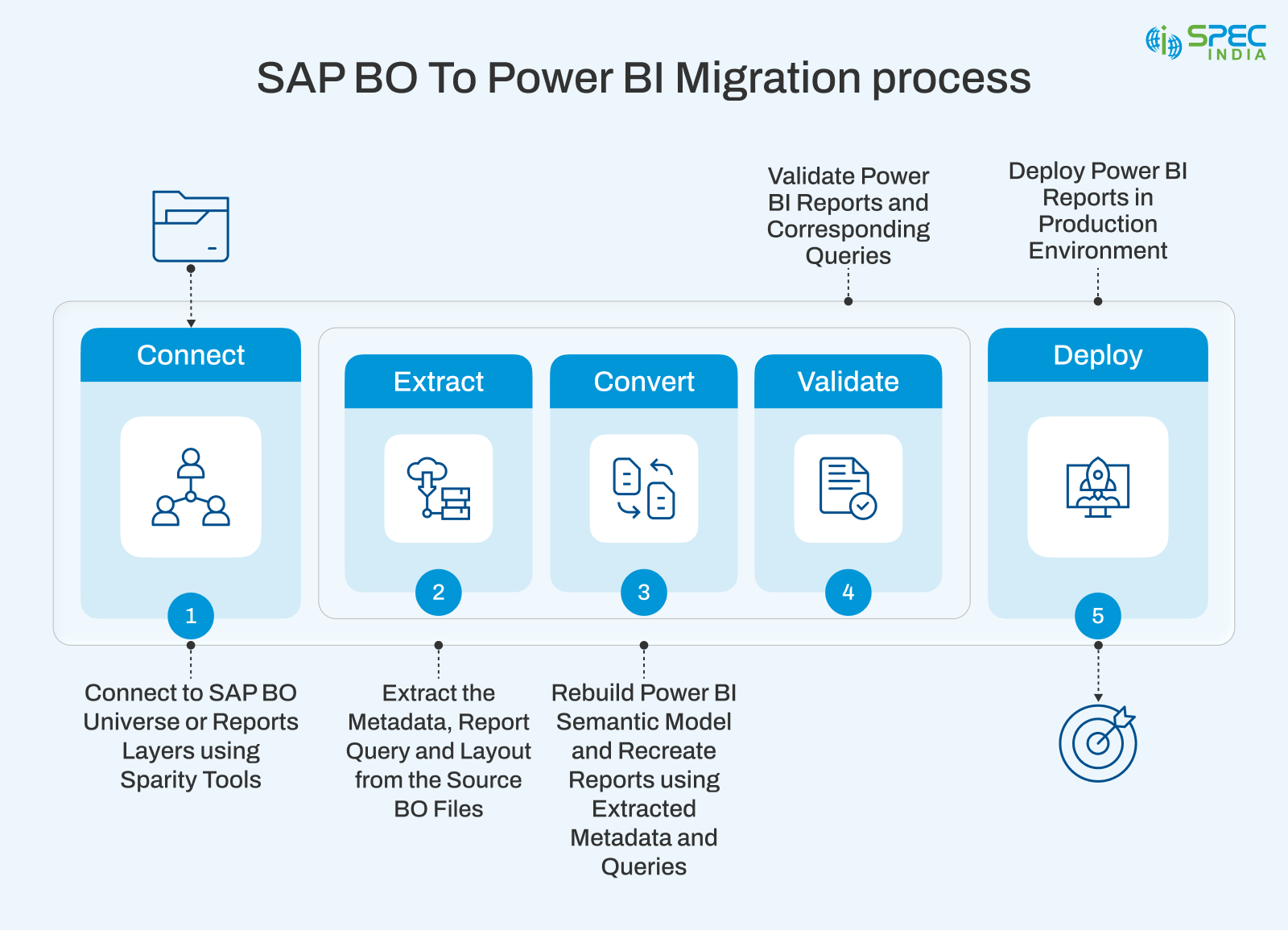
SAP BO vs Power BI: A High-Level Comparison
Common Triggers That Push Enterprises to Migrate
For most enterprises, moving out of SAP BO is not an overnight decision but a process that takes time. The obstacles appear minor and easy to overcome at the beginning. Creating a report is not easy. IT support is required to update the dashboard. A business user exports data to Excel to answer a quick question. These problems are not urgent individually, but when combined, they create tension throughout the organization.
These small inefficiencies are increasingly difficult to overlook as data volumes continue to grow and business expectations rise. Expenses continue to increase, the reporting cycle slows, and teams struggle to access timely information when they need it most. Business users are frustrated, IT teams are overworked, and leadership is increasingly wondering whether the current BI configuration is accelerating the organization or dragging it backward.
This is where businesses begin reevaluating their BI strategy and exploring more agile, self-service, and future-proof platforms. This is also when enterprises begin considering a migration from SAP BusinessObjects to Power BI to modernize reporting, improve performance, and redesign analytics using scalable Power BI data models and flexible reporting options such as Power BI Report Builder.
- Increased Cost of licensing, infrastructure, and maintenance in the long run.
- Deep Reliance on IT Departments to meet Daily Reporting Requirements.
- Performance and Scalability Challenges as Data Volumes Increase.
- Limited Support for Modern, Interactive Analytics
- Increasing Self-Service Analytics Demands by Teams.
- Modernizing Legacy BI is necessary as a part of Digital Transformation.
- Uncertainty of Long-term Product Roadmap and Innovation.
Tip: When multiple triggers appear together, like rising costs, slow performance, and low user adoption, migration becomes a strategic necessity. Explore real-world Power BI Dashboard Examples to understand how modern analytics can address these challenges.
Conclusion: Moving Beyond Legacy BI
Enterprises today operate in an environment where data-driven decision-making is no longer optional. The businesses currently require agile, self-service, and cloud-ready analytics. While SAP BO has played an important role in enterprise reporting for many years, modern business intelligence now requires platforms that can adapt to evolving business needs, increasing data volumes, and the demand for faster decision-making.
Here, Power BI is the best option. It allows teams to gain insights faster, analyze data independently, and work more closely together without overreliance on IT. In the context of leadership, it implies making decisions more quickly and with greater confidence. For IT teams, this translates to less time spent maintaining legacy systems and more time on innovation and governance.
Power BI is not a substitute for SAP BO for enterprises seeking to unleash more of their data. It is an opportunity to implement a modern analytics framework, enhance business agility, and empower the organization, creating a stronger foundation for future growth and data-driven success.
If your organization is still relying on SAP BO and experiencing performance, cost, or user adoption challenges, this may be the right time to consider migrating to Power BI. A well-planned migration can help you modernize analytics without disrupting ongoing business operations. Contact us today to migrate your SAP BO Reports to Power BI.
Moreover, as Microsoft continues to expand the Fabric ecosystem around Power BI, enterprises can expect richer analytics capabilities and a truly unified data platform. Stay tuned for future updates.

SPEC INDIA is your trusted partner for AI-driven software solutions, with proven expertise in digital transformation and innovative technology services. We deliver secure, reliable, and high-quality IT solutions to clients worldwide. As an ISO/IEC 27001:2022 certified company, we follow the highest standards for data security and quality. Our team applies proven project management methods, flexible engagement models, and modern infrastructure to deliver outstanding results. With skilled professionals and years of experience, we turn ideas into impactful solutions that drive business growth.
Table of contents
Delivering Digital Outcomes To Accelerate Growth
Let’s TalkTable of contents
Delivering Digital Outcomes To Accelerate Growth
Let’s Talk
Let’s get in touch!
India
SPEC House, Parth Complex, Near Swastik Cross Roads, Navarangpura, Ahmedabad 380009, INDIA.
-
 +91-79-26404031, 32-33-34
 -
 [email protected]