

Microsoft Fabric Architecture: How Data Engineering, BI, and AI Come Together
March 23, 2026
In the world of enterprise data, we’ve spent the last decade building walls. We built walls between the people who move the data, the people who analyze it, and the people who use it to train AI models. We called these walls “specialization,” but they became silos. These silos are now the biggest tax on innovation.
Today, data teams are under pressure that would have been unimaginable a few years ago. It’s no longer enough to just “have” data; you must deliver insights at the speed of thought while juggling a mountain of tools and high-stakes security requirements. According to recent industry research, companies that move toward a unified analytics platform microsoft see a massive jump in decision speed and data trust.
This is exactly where Microsoft Fabric Architecture enters the conversation. It isn’t just another tool to add to your stack; it’s a way to collapse the stack into something that works. By pulling data engineering, BI, and AI into a single, cohesive experience, it changes the game for how we build on Azure.
Why Your Enterprise is Drowning in “Tool Sprawl”
Let’s be honest: most enterprise data environments are a “spaghetti” mess of integrations. Your cloud data engineering team is ingesting data in one place, your Microsoft Power BI development team is building reports in another, and your data scientists are running experiments in a third, isolated pocket.
This fragmentation creates a “Data Tax.” You pay it every time you duplicate data, every time a report doesn’t match the source, and every time a project is delayed because of a manual handoff. A unified analytics platform microsoft solves this by creating a shared foundation. When everyone is looking at the same “Source of Truth,” you stop fighting over whose numbers are right and start using them.
For years, Microsoft Azure development involved stitching together Azure Data Factory, Synapse Analytics, and Power BI. While these are powerful, the “glue” required to keep them together became a full-time job for many engineers. Fabric is the answer to that complexity.
The Deep Dive: Microsoft Fabric Architecture Explained
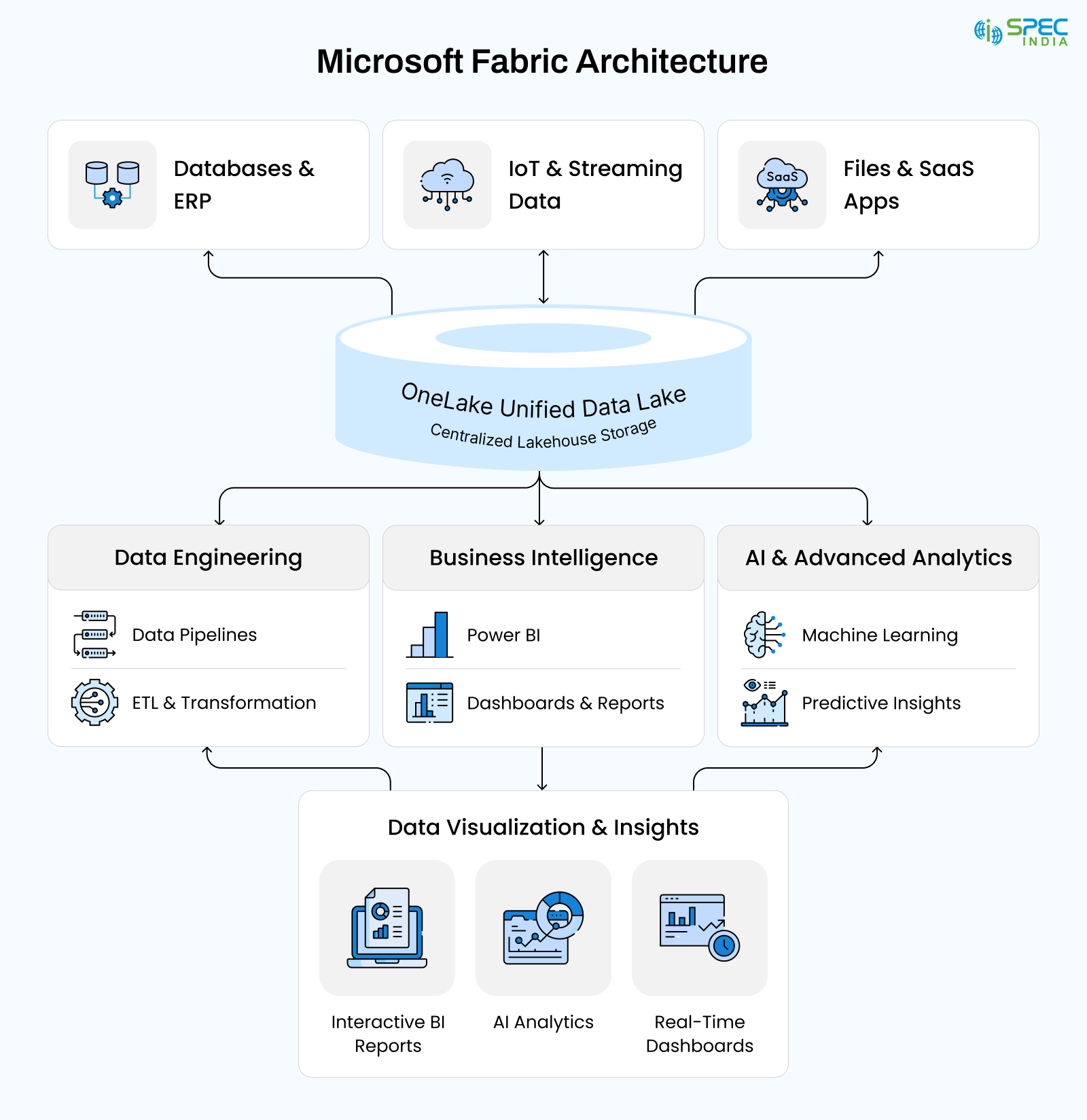
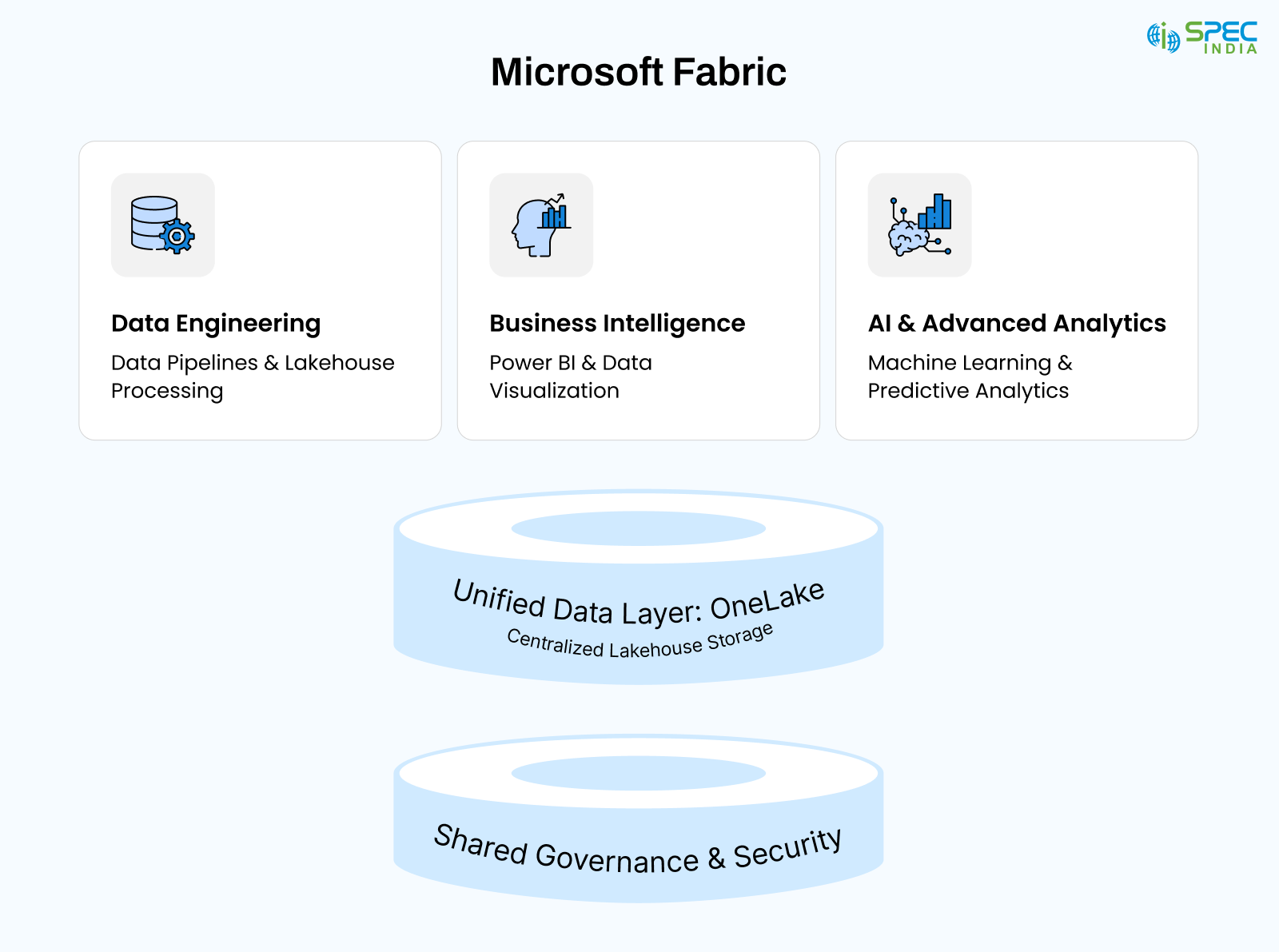
The “secret sauce” of Azure Data Fabric architecture is its shared storage and compute model. At the heart of it all is OneLake. Imagine a single, logical data lake for your entire company. No more “My Lake” vs. “Your Warehouse.”
The core principles of this architecture are simple:
1. OneLake Centralization: Everything reads from and writes to the same spot.
2. Shared Metadata: The rules you set for your data in engineering follow that data all the way to the Power BI dashboard development stage.
3. Integrated Compute: Whether you’re doing heavy lifting in Microsoft Fabric data engineering or fine-tuning Microsoft Fabric AI integration, you’re using the same engine.
This alignment follows the best patterns of Microsoft Azure Development, treating data as a shared enterprise asset rather than a collection of private files. It’s about creating a “Data Mesh” that works without the overhead.
Governance, Security, and Trust in a Unified Fabric Architecture
In the world of high-stakes data, governance is usually the conversation everyone avoids until something breaks. In a classic, messy stack, security is a fragmented nightmare. Every tool has its own set of rules, its own “gatekeepers,” and its own way of defining who gets to see what. Eventually, you don’t have control; you just have a massive headache.
This is where the Microsoft Fabric architecture completely flips the script. It stops treating governance like a chore you do at the end and starts treating it as a shared foundation. Because your Microsoft Fabric data engineering tasks and your Microsoft Fabric AI integration projects pull from the same “well,” the security rules travel with the data. You aren’t redefining the wheel at every layer; you’re building on a unified analytics platform, Microsoft, that remembers the rules you set at the start.
In the real world, this means a hell of a lot less manual double-work. Once you apply a security tag or data classification within the Azure Data Fabric architecture, it sticks. It doesn’t matter if you’re building Microsoft Fabric data pipelines; the “Access Denied” stays “Access Denied.” Your engineers don’t have to waste their lives duplicating security logic downstream, and your analysts don’t have to second-guess if they’re looking at the “official” version of the truth.
But trust isn’t just about locking doors; it’s about shared language. This is where Microsoft Fabric Business Intelligence shines. By leaning on centralized semantic models, you stop the “meeting before the meeting” where everyone tries to figure out why the revenue numbers don’t match. When the CEO looks at a Power BI dashboard development project, and the operations lead looks at their internal Microsoft BI tools, they are finally seeing the same reality.
This model is a lifesaver for digital transformation solutions. Instead of burying your data under a mountain of red tape that kills innovation, you’re creating a safe sandbox. Your teams can experiment with predictive analytics services and high-end data visualization with Microsoft Fabric without worrying they’ve accidentally stepped outside the guardrails.
At the end of the day, a Microsoft fabric architecture diagram isn’t just showing you where the bits go; it’s showing you how to build a culture of trust. It turns security from a “stop sign” into a set of tracks that keep your Microsoft Azure development and cloud data engineering moving at full speed, safely.
5 Core Microsoft Fabric Components
The beauty of Microsoft fabric architecture is that its parts are “baked in,” not “bolted on.” You aren’t managing separate subscriptions for every task. You’re interacting with a unified set of Microsoft Fabric components.
1. Data Factory (Enhanced)
This is the heart of your data movement. It uses the familiar Power Query experience along with massive scale to handle Microsoft Fabric data pipelines. It makes cloud data engineering feel less like manual labour and more like strategic orchestration.
2. Synapse Data Engineering
This is where the Spark fans live. It provides a first-class experience for Microsoft Fabric data engineering, allowing you to write code or use low-code tools to transform massive datasets.
3. Synapse Data Warehouse
For those who prefer SQL, this provides a high-performance warehouse experience that reads directly from OneLake. It’s the perfect bridge for teams transitioning from traditional Microsoft Azure development to a more modern lakehouse approach.
4. Synapse Data Science
This is where Microsoft Fabric AI integration happens. Data scientists can build, train, and deploy models without ever moving the data out of the governed environment.
5. Power BI
This remains the gold standard for Microsoft BI tools. In Fabric, Power BI is more than just a reporting tool; it’s the window through which the entire company sees its data.
Doing the Heavy Lifting: Data Engineering in Fabric
In the old world, cloud data engineering was a constant battle with infrastructure. You spent 40% of your time just making sure the clusters were running. Microsoft Fabric data engineering changes the focus back to the data itself.
Because these pipelines operate directly on OneLake, you skip the “Copy-Paste” tax. In traditional architectures, you might move data from a landing zone to a staging area, then to a warehouse, and finally to a BI cache. Each move is a chance for things to break. With Fabric, the data stays put. The computer comes to the data.
This shift makes your cloud data engineering faster, cleaner, and significantly cheaper to maintain over the long haul.
Intelligence That Works: Business Intelligence with Fabric
Microsoft Fabric Business Intelligence isn’t just about making pretty charts; it’s about ensuring those charts are accurate. We’ve all been in meetings where two different departments bring two different “Revenue” numbers. That happens because they are looking at two different versions of the data.
With Fabric, that’s over. Analysts work on shared semantic models. This leads to:
- Metric Consistency: One definition of “Profit” for the whole company.
- Seamless Collaboration: Your engineers and your Microsoft Power BI development experts are finally in the same sandbox.
- Direct Lake Mode: This is a revolutionary feature. Power BI can now read massive datasets directly from OneLake without “importing” them. This means your data visualization with Microsoft Fabric always uses the freshest available data.
The Future: AI and Predictive Analytics
We’ve moved past the era where AI was a “science project” in the corner. Microsoft fabric AI integration brings machine learning directly to your governed data.
When you combine your data lake with predictive analytics services, you can start answering the questions that really matter:
- “Which customers are likely to churn next month?”
- “What is our expected inventory need for the holiday season?”
- “Where are the hidden inefficiencies in our supply chain?”
By unifying AI with Microsoft Fabric data engineering, you remove the barriers that usually kill AI projects before they ever hit production. You aren’t just doing “AI”; you’re doing “Operational AI.”
Power BI and the Art of Data Visualization
Within the Fabric ecosystem, Microsoft Power BI development serves as the bridge between data and the decision-maker. It’s not an “add-on”; it’s a native part of the experience.
For teams focused on Power BI dashboard development, Fabric is a massive productivity booster. You can build data visualization services that are faster and more reliable by pulling directly from the Fabric Lakehouse.
When you combine these services with a unified foundation, you stop having meetings about “why the numbers don’t match” and start having meetings about “how to grow the business.” This is the pinnacle of Microsoft Fabric business intelligence.
When Microsoft Fabric Makes Sense and When It Doesn’t
Choosing to jump into Microsoft Fabric Architecture shouldn’t be a “knee-jerk” reaction just because it’s new. It works best when it mirrors how your humans work, how messy your data habits are, and the specific fires you’re trying to put out. In a healthy ecosystem, it can evaporate years of built-up tech debt. In a chaotic one, it might just feel like another layer of “shiny” abstraction you don’t need.
Microsoft fabric architecture is a lifesaver when your company is already drowning in fragmentation. If your cloud data engineering guys, your BI analysts, and your data scientists are living on separate planets, Fabric gives them a common ground. It’s for teams who are sick of spending 80% of their week arguing over whose numbers are “right” instead of driving digital transformation.
It is also a “no-brainer” for shops that have already gone all-in on Microsoft Azure development and Microsoft Power BI development. If Power BI is already your window into the business and Azure is your backbone, Fabric just removes all that “architectural glue” that usually keeps your engineers up at night. In these cases, moving to an Azure Data Fabric architecture doesn’t feel like a forced migration; it’s finally letting the platform do what it was meant to do.
However, let’s be honest: Fabric isn’t a universal “easy button.” If you’re a tiny team with simple Microsoft Fabric data pipelines and your AI goals are still in the “science project” phase, the sheer weight of a unified analytics platform might actually slow you down. You don’t buy a semi-truck to move a single box.
More importantly, Fabric demands a massive culture shift. You have to stop treating data as a private stash owned by a single department and start treating it as a shared enterprise asset. Without that “people” alignment, you’ll never fully use the Microsoft Fabric components or the predictive analytics services you’re paying for.
At the end of the day, a Microsoft fabric architecture diagram should solve real coordination headaches that are killing your speed right now. It’s less about “futureproofing” for a scale you might never hit and more about fixing the broken workflows that are frustrating your Microsoft Fabric business intelligence and Power BI dashboard development teams today.
Industry Deep Dives: Where Fabric Makes the Difference
To truly understand the value of a unified analytics platform, Microsoft, you have to see it in action across different sectors.
-
Retail: Winning the “Last Mile”
Retailers use Microsoft Fabric data engineering to sync point-of-sale data with supply chain reality. Through data visualization with Microsoft Fabric, they can see inventory gaps in real-time. But the real win is using predictive analytics services to stock up before a trend peaks. If your data is 24 hours old, you’ve already lost the sale.
-
Manufacturing: The Predictive Factory
Factory floors generate a firehose of data every second. Using Microsoft Fabric data pipelines, manufacturers can monitor equipment health in real-time. BI dashboards provide the KPIs for the floor manager, while AI models predict when a machine is about to fail. This isn’t just “tech,” it’s a way to save millions in avoided downtime.
-
Logistics: Global Transparency
In the world of freight, transparency is the only currency that matters. Logistics teams use data visualization services within Fabric to track shipments and optimize routes across different time zones. It’s about moving from “Where is my truck?” to “Here is the most efficient route for the next 500 trucks based on current weather and traffic.”
-
Healthcare: Precision and Privacy
Precision is non-negotiable in healthcare. Providers use Microsoft Fabric Business Intelligence to analyze patient flow and billing accuracy. Centralized governance ensures they stay compliant with strict regulations while using AI to improve care delivery. It’s a way to provide better outcomes without increasing the administrative burden.
-
Energy & Utilities: Balancing the Grid
Managing usage spikes requires a steady hand and perfect data. Utilities use Fabric to unify sensor data from the grid with customer billing information. Predictive analytics services help them forecast demand, while Microsoft BI tools keep the operational teams in sync during a crisis.
Final Thoughts: The Road Ahead
The “old way” of managing data, where engineering, BI, and AI lived in separate, warring silos, is over. Modern enterprises can no longer afford the lag, costs, or errors that come with fragmented systems.
Microsoft Fabric architecture is the answer to that challenge. By bringing together Microsoft Fabric data engineering, Microsoft Fabric business intelligence, and Microsoft Fabric AI integration, you can stop fighting your tools and start using your data as a weapon for growth.
Whether you are deep into Microsoft Power BI development or building complex Microsoft Fabric data pipelines, Fabric gives you a single, clear path forward. It’s time to stop managing the “mess” and start managing the “strategy.”
Digital transformation is not a project you finish; it’s a capability you build. And with a unified analytics platform from Microsoft, that capability is finally within reach for every enterprise.
Let’s map out your transition to a unified, Fabric-powered future. We don’t just build systems; we build the foundations for your next decade of growth.
Frequently Asked Questions
Fabric kills the "export-and-import" loop by letting Microsoft fabric data engineering and BI teams work off the same live data in OneLake. This ensures your Microsoft BI tools are always in sync with what the engineers are building, ending the struggle of mismatched metrics.
OneLake acts as the "central heart" of the Microsoft Fabric architecture, working like a OneDrive for your entire data stack. It allows teams in cloud data engineering and Microsoft Fabric AI integration to share one source of truth without the mess of duplicating files.
Instead of manually "gluing" services together, Fabric weaves them into a single unified analytics platform. It streamlines Microsoft Azure development by combining storage, Microsoft Fabric data pipelines, and reporting into one engine rather than five separate subscriptions.
The real win is moving from raw data to a Power BI dashboard development project in hours instead of weeks. It slashes the "infrastructure headache," builds trust in the numbers, and provides a scalable base for digital transformation solutions.
It’s built specifically for the Lakehouse era, merging the flexibility of a lake with the speed of a warehouse. It’s a shortcut for Azure Data Fabric architecture, handling the heavy lifting of Microsoft Azure development so your team can focus on predictive analytics services.

SPEC INDIA is your trusted partner for AI-driven software solutions, with proven expertise in digital transformation and innovative technology services. We deliver secure, reliable, and high-quality IT solutions to clients worldwide. As an ISO/IEC 27001:2022 certified company, we follow the highest standards for data security and quality. Our team applies proven project management methods, flexible engagement models, and modern infrastructure to deliver outstanding results. With skilled professionals and years of experience, we turn ideas into impactful solutions that drive business growth.
Table of contents
- Why Your Enterprise is Drowning in "Tool Sprawl"
- The Deep Dive: Microsoft Fabric Architecture Explained
- Governance, Security, and Trust in a Unified Fabric Architecture
- 5 Core Microsoft Fabric Components
- Doing the Heavy Lifting: Data Engineering in Fabric
- Intelligence That Works: Business Intelligence with Fabric
- The Future: AI and Predictive Analytics
- Power BI and the Art of Data Visualization
- When Microsoft Fabric Makes Sense and When It Doesn’t
- Industry Deep Dives: Where Fabric Makes the Difference
- Final Thoughts: The Road Ahead
Delivering Digital Outcomes To Accelerate Growth
Let’s TalkTable of contents
- Why Your Enterprise is Drowning in "Tool Sprawl"
- The Deep Dive: Microsoft Fabric Architecture Explained
- Governance, Security, and Trust in a Unified Fabric Architecture
- 5 Core Microsoft Fabric Components
- Doing the Heavy Lifting: Data Engineering in Fabric
- Intelligence That Works: Business Intelligence with Fabric
- The Future: AI and Predictive Analytics
- Power BI and the Art of Data Visualization
- When Microsoft Fabric Makes Sense and When It Doesn’t
- Industry Deep Dives: Where Fabric Makes the Difference
- Final Thoughts: The Road Ahead
Delivering Digital Outcomes To Accelerate Growth
Let’s Talk
Let’s get in touch!
India
SPEC House, Parth Complex, Near Swastik Cross Roads, Navarangpura, Ahmedabad 380009, INDIA.
-
 +91-79-26404031, 32-33-34
 -
 [email protected]