| Category | Crystal Reports | Power BI |
|---|---|---|
| Purpose | Static and manual Reporting | Interactive analytics with enterprise BI modernization |
| Reporting Style | Page-based and print-oriented Reports | Dynamic, visual, and interactive dashboard |
| Data Integration | Limited connectors depend on embedded SQL | Strong cloud, on-premises, and API integration |
| Data Models | No reusable semantic layers | Centralized and reusable data with strong governance |
| Self-Service Capability | Low capability, as it requires developers | High capability, and users can create Reports without the need for developers |
| Advanced Analytics | Formula-backed logic with minimal analytics | AI insights, DAX modeling, predictive, and natural language queries |
| Engagement | Limited | Highly interactive |
| Automation | Basic scheduling | Automates refreshing, dataflow pipelines, and enterprise deployment pipelines |
| Cost-Efficiency | Expensive due to development and maintenance | Lower TCO with flexible licensing and quite economical IT dependency |
| Governance & Security | Limited governance with basic security | Enterprise-level governance and row-level security, along with compliance features |
| Scalability | Limited due to legacy architecture | Highly scalable and supports voluminous datasets and cloud computing |


Loading...
Crystal Reports to Power BI: A Complete Migration Strategy for Self-Service BI
Do you know that Reporting is one of the business growth pillars?
It helps C-suite professionals make strategic decisions for opportunities, innovation, and expansion.
But are all businesses growing or expanding in their niche? The simple answer is no. Enterprises still rely on Crystal Reports, which delays access to critical data, burdens IT teams, and limits real-time visibility. This has been a decade of process now, but not anymore.
Organizations have started adopting the technological evolution, which starts with implementing a modern analytics platform called Power BI. It offers real-time intelligence and emerges as the leading choice of global enterprises. Self-reporting saves 2 hours/week, 2.5x times faster report generation, and ROI in just half a year are some of the few rewards.
Almost 97% of Fortune 500 companies depend on Power BI for business intelligence – (Source: Acuitytraining).
For C-suite leaders, the existing SSRS to Power BI migration is worth every penny. It will help them access their data easily, strengthen governance, and enable analytical capabilities across the organization. With Power BI, you can expect to have an interactive dashboard, data models, AI-based insights, and robust security and governance.
This article discusses why and how to migrate. Plus, what should be kept in mind during the transition. So, let us begin.
Why Modern Enterprises Are Rapidly Moving from Crystal Reports to Power BI?
Organizations have started investing in legacy reporting digital transformation, due to which the limitations of Crystal Reports are visible to decision-makers. The once-a-staple for operations reporting now lacks modern-day demands like real-time information, actionable insights, and flexibility. Considering the market requirement, the Crystal Reports to Power BI migration becomes a strategic priority for enterprises wanting to stay ahead in the competition.
Let us have a look at what benefits a new-age Reporting platform brings to the table.
Advance Analytics & Reporting
Unlike traditional Crystal Reports, Power BI offers advanced analytics capabilities. It provides users with intuitive and speedy analysis using DAX calculations, AI-backed insights, natural language querying, and predictive analytics. Having Power BI tools for Reporting means you can make mature and timely decisions. Besides, you get to unlock hidden opportunities and model scenarios.
Strategic Data Integration
While Crystal Reports were stored in silos or embedded SQL queries, Power BI comes with seamless integration to both on-premises and cloud-backed data sources. It is a hub under which you will get to access ERP, CRM, data warehouses, and even SaaS platforms. Such strategic data integrations enable a governed model that improves consistency and cross-functional analytics. As a result, you will be in a better position to make strategic decisions based on real-time insights.
Interactive Dashboards
What is more appealing about Power BI is its report presentation capabilities. It turns simple numbers into an interactive dashboard that shows data through charts and diagrams. A broader and detailed perspective of your business operations, revenue, and scalability. It even helps with driving user engagement and decision-making speed.
Cloud & AI Capabilities
Crystal Reports were simply page-based reports that stack up. On the other hand, Power BI comes with the Microsoft cloud ecosystem that offers AI features. It means you do not need to maintain on-premises infrastructure, and it even identifies anomalies, helping your business with the insights that might go hidden.
Budget-Friendly
Power BI is a budget-friendly licensing model compared to Crystal Reports. It has minimal IT maintenance overhead and rapid development cycles. Businesses have noticed a massive reduction in spending on server-based deployments and are depending on specialized report developers. If your enterprise is looking for a solution where you do not need to incur excessive expenditure, Power BI’s value-to-cost ratio is worth looking into.
Self-Service Analytics
Crystal Reports require manpower for development, alteration, and distribution, which makes the process and operations sluggish. Power BI, on the contrary, comes with drag-and-drop interfaces, natural language querying, and self-service capabilities. With such data democratization, users will get answers to their questions without overloading their IT budget and operations.
The shift from Crystal Reports to Power BI is inevitable due to recognition from large organizations and limitations of traditional Reports. You can also know more from BI migration consulting services. But before diving deep into the migration process and strategy, it is also important to understand the fundamental difference between these two platforms.
A clear comparison between Power BI and Crystal Reports will help you know why there are certain limitations in Crystal Reports and what makes Power BI enterprise-friendly.
Crystal Reports vs Power BI: Key Differences That Impact Migration
Now that you understand the importance of transitioning from Crystal Reports to Power BI, it is also essential to review the roadmap. This BI data comparison helps investigate every detail thoroughly. Additionally, some challenges could hinder a smooth transition. These challenges are a result of decades of manually building Crystal Reports, embedded SQL queries, and hidden business logics. Such challenges are better known so that they can be addressed before, during, and after migration.
Challenges in Migrating from Manual Crystal Reports to Power BI
Crystal Reports has served organizations of all sizes for more than a decade. It handles structured, operational, and even print-ready reporting. However, as requirements for real-time insights and interactive analytics evolve, organizations should consider a few key factors when migrating to Power BI.
-
Fragmented and Uncatalogued Reports Inventories
Since Crystal Reports have been widely used in your business over the years, there will be substantial data. Now it becomes slightly more challenging to identify, catalogue, and prioritize reports for migration. You may require an assessment to define the relevance and usability.
-
Embedded SQL Queries and Hard-Coded Logic
Crystal Reports uses SQL queries, formulas, and parameters to support report-centric designs. During migration, the logic needs to be carefully reviewed and adapted to Power BI’s DAX and Power Query frameworks to ensure all your business rules are preserved.
-
Inconsistent Data Sources and Definitions
Crystal Reports evolves with changes in data connections, naming conventions, and metric definitions. It is essential to meet such variations in a consistent, centralized Power BI database, which requires additional reconciliation and validation efforts during migration.
-
Limited Governance and Version Control
In Crystal Reports, governance standards were implemented incrementally. This results in multiple reports, overlapping functionality, or unclear ownership, requiring businesses to implement transparent governance models during the Power BI migration.
-
Performance Bottlenecks in Outdated Architecture
Crystal Reports environments are well-suited to static reporting, as they are built on on-premises databases and batch-oriented processing models. Before migrating, ensure Power BI supports interactive and refresh-driven analytics.
-
Skill Gaps Between Crystal Developers and Power BI Teams
Migrating from Crystal Reports to Power BI also requires developer upskilling. The modern approach to reporting requires restructuring the data model, DAX, and interactive data visualization skills.
That is the first step in understanding the challenges of legacy Crystal Reports. The next step is to execute a structured migration plan with accuracy and stability. The section below outlines a detailed process for optimizing Power BI capabilities.
Get ready to redefine your existing analytics and Reporting structure.
-
20% Cost Saving Using Migration from Crystal Reports to Power BI
Understanding potential cost savings is a key driver of many Crystal Reports-to-Power BI migration initiatives. By transitioning to a modern, cloud-enabled analytics platform, organizations can reduce licensing expenses, infrastructure overhead, and ongoing maintenance costs while improving reporting efficiency. A cost-saving calculator helps quantify these benefits by translating operational improvements and reduced total cost of ownership into measurable financial impact, enabling stakeholders to evaluate the true ROI of reporting modernization.
[blog_calculator]
How to Migrate from Crystal Reports to Power BI?
This transition from Crystal Reports to Power BI requires a systematic approach that makes sure to balance technical precision with business priorities. Besides, the legacy Reports migration undertakes evaluating data architecture, determining business logic, and revamping the analytics experience. You can even know more about legacy software modernization to get a detailed idea. But before that, let us understand the steps of migration and how it works.
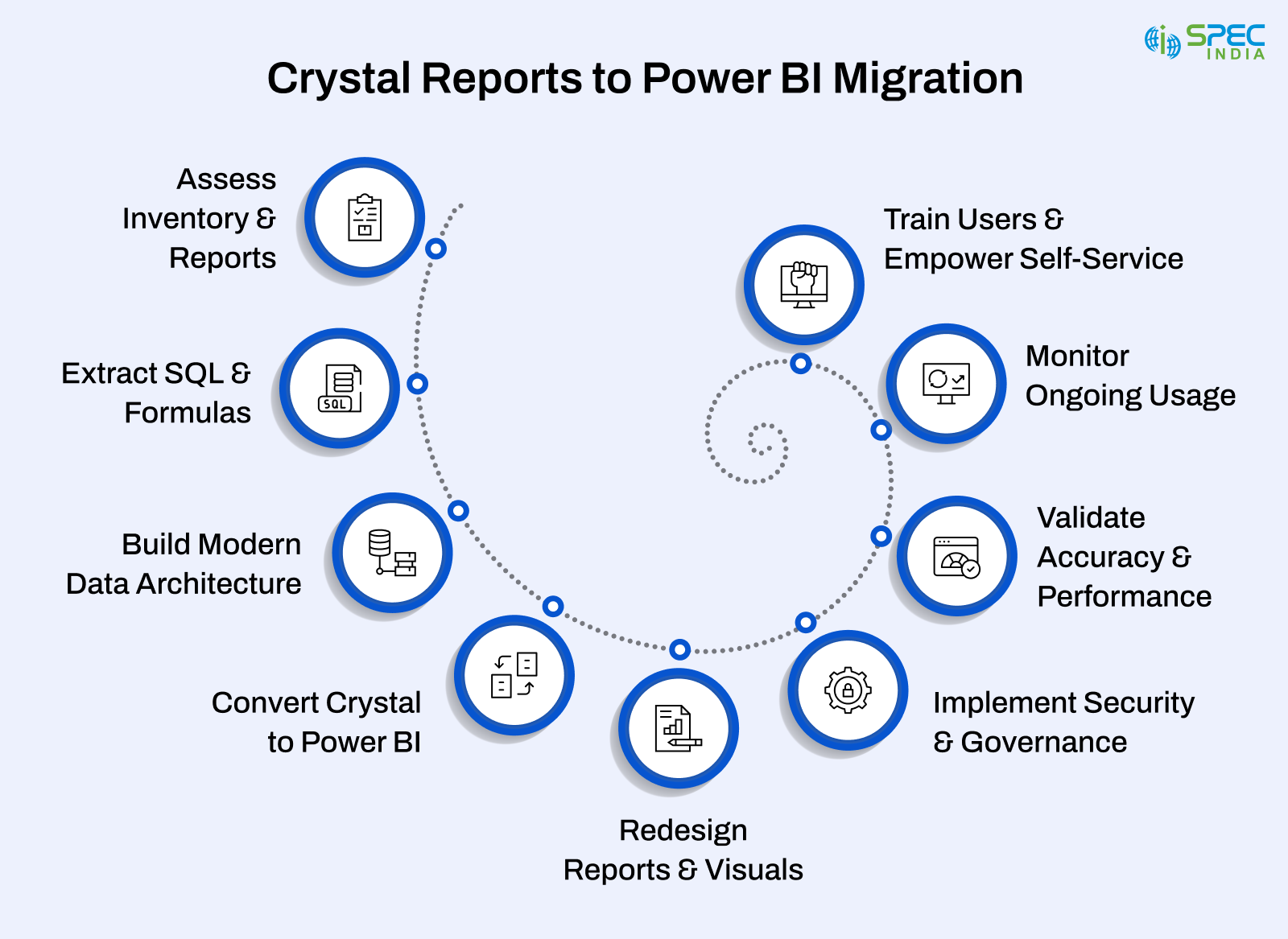
Assess Existing Inventory & Crystal Reports
You must start gathering all the Crystal Reports created so far across the department. Sort out details like usage frequency, data sources, dependencies, and complexities. As a result, you will have a bunch of Reports that make it easier for you to migrate, consolidate, redesign, or retire.
Activities to be done:
- Collecting Reports names, owners, and previously used dates
- Sorting out duplicates and outdated ones
- Stacking Reports based on priority and impact
Fetch SQL Logic, Formulas, and Calculations
Traditional Crystal Reports consists of embedded SQL, formulas, and manual calculations. Such data should be fetched, evaluated, and mapped to Power BI equivalents.
In this case, you must review:
- SQL queries, filters, and stored procedures
- Formula fields and conditional calculations
- Parameter logic and grouping rules
Create a Modern Data Architecture for Power BI
Legacy Crystal Reports are connected to transactional databases, whereas Power BI leverages a central and reusable data model to ensure consistency and accuracy.
The focus areas should be:
- Build star-schema data models
- use data warehousing & ETL solutions
- Implement Power BI data gateway, dataflows, and semantic models
Translate Crystal Logic Into DAX, Power Query, and Data Models
Migrate the logic and structure of each data report once the data architecture is ready.
In this situation, conversion activities include:
- Rewriting SQL-based transformation in Power Query
- Converting formulas and calculations into DAX measures
- Mapping, grouping, parameter logic, and sorting into Power BI visuals and filters
Reimaging Reports, Paginated Outputs, and Visual Analytics
You must select the Crystal Reports to become a Power BI dashboard because not every report can be migrated.
Options include:
- Power BI dashboards: for KPIs and interactive exploration
- Standard Power BI Reports: for drill-down analysis
- Paginated Reports: for invoice-style or print-ready layouts
Establish Enterprise-Level Security, Governance, and Deployment Pipelines
Power BI offers robust security and governance for businesses.
Such factors need to be set up:
- Row-level security
- Workspace governance and user permissions
- Data refresh schedules
- Deployment pipelines
Accuracy Validation Through Pilots and Performance Optimization
You must run a pilot project before rolling out the final version.
Such actions require:
- Accuracy validation of measures and KPIs
- Confirm interactive functionality
- Optimize model, performance, and refresh
Enable User Adoption Through User Training and Self-Service Empowerment
When you empower users, your Power BI strategy succeeds. You must provide training sessions, usage guides, and workshops to introduce the new analytics experiences.
Here, the focus areas are:
- Navigating dashboards
- Using filters, slicers, and drill-down
- Creating self-service Reports
Continuously Track Power BI Usage
Once Power BI Reports are validated and adopted, they require decommissioning the corresponding Crystal Reports to avoid redundancy and confusion. You must keep a track of usage analytics to measure the improvement and alignment with evolving business requirements.
So, these were the steps to successfully migrate from Crystal Reports to Power BI. The next step is to make sure that the process is conducted efficiently and leaves zero risks during or after migration.
Here are the best practices that we, as a leading Power BI development services provider, follow.
Ready to Migrate from Crystal Reports to Power BI?
Modernize your reporting with a seamless, end-to-end migration strategy. Our experts help you rebuild dashboards, automate workflows, and enable self-service BI; without disrupting operations.
10 Best Practices for Successful Migration from Crystal Reports to Power BI
With best practices strictly followed, you can expect people, processes, and technology to be fully functional and operational.
1. Prioritize Business Value Reports
Do not move all Reports one-by-one; instead, prioritize the Reports that matter the most and give the most value. Many companies find out they can get rid of or combine 30–50% of their Crystal Reports. This cuts down on the work needed to move them. When you choose what to focus on, you make sure you use your resources well and get results that line up with what your business wants to achieve.
2. Uniform Data Models
What makes Power BI great is its central data models, not separate queries. Create strong, reusable semantic models using star-schema ideas. This helps keep things consistent, under control, and able to grow. It stops you from having to repeat the same logic in different Reports and makes everything run faster across your whole analytics setup.
3. Document Existing Logic
Crystal Reports often hides calculations in formulas, embedded SQL, and parameter logic. Good documentation helps prevent gaps during migration and makes sure that KPIs, metrics, and business rules translate into Power BI’s DAX and Power Query environment.
4. Do Not Replicate
Do not copy and paste Crystal Reports. Make sure to redesign reports so that you can use Power BI’s features like interactive visuals, drill-down, AI insights, and dynamic filtering. As a result, it enhances user experience and delivers more analytical value.
5. Implement Strong Governance
You must implement the practice of defining rules to handle the digital environment, like dataset ownership, security roles, and publishing processes. Power BI’s Row-Level Security (RLS), deployment pipelines, and usage monitoring enable control and follow regulations across your company.
6. Automate Wherever Possible
Power BI Dataflows scheduled updates, deployment pipelines, and reusable datasets eliminate manual dependency. With automation, you can expect high accuracy, faster delivery, and minimal ongoing work as compared to Crystal Reports.
7. Engage Business Stakeholders
Always make sure to involve your users throughout the migration process to check for logic fine-tuning needs and make sure the new method aligns with real demands. When you collaborate during the migration, you will never face challenges later.
8. Build a Power BI Center of Excellence (CoE)
Another best practices that need to be followed is setting up a CoE to maintain standards, train users, and keep an eye on governance. A CoE fastens up self-service analytics while keeping data quality and security in check.
9. Invest in Training to Drive Enterprise Adoption
You must have adopted Power BI, but onboarding a skilled team is also important. You can hire them and provide job-specific training. Besides, you can even provide practical workshops to help teams understand the Power BI tool.
10. Continuously Monitor, Optimize, and Iterate
This is another best practice that every organization considering migration should follow is using Power BI’s performance analyzer, usage metrics, and workspace monitoring. It helps to upgrade your Reports performance and understand what really matters to your users. When you opt for constant improvement, your analytics system aligns with shifting paradigms.
As companies move an inch forward to execute migration, cost analysis becomes crucial. A detailed cost breakdown of Crystal Reports to Power BI helps business owners know its expected returns, staff requirements, and long-term scalability against the investment.
Cost Analysis for Migration Process
To plan a successful Crystal Reports to Power BI migration, you need to know the costs upfront.
Here is why figuring out the expenses ahead of time matters:
- Sets a Realistic Migration Budget: You must consider elements from data modeling to report redesigning so that you can set specific budget for the same.
- Spots Resource and Skill Needs: When you finalize the cost breakdown, it will show you whether you can accommodate in-house teams, outside experts, or opt for a hybrid approach.
- Licensing and Infrastructure Cost: Another costing factor that you must consider is Power BI’s licensing fees and cloud setup while preparing the budget.
- Long-Term Running Savings: When you upgrade from Crystal to Power BI, it reduces upkeep, manual work, and system costs.
- ROI Predictions to Get Approval: When you prepare a detailed cost breakdown, it becomes easier to get approval.
- Matches Migration Spending with Key Goals: Cost insights help shape choices about which reports to move first and how to stage the project.
Conclusion
Moving from Crystal Reports to Power BI marks a key shift towards building a modern, scalable, and data-driven analytics setup. When you have a solid plan along with modernization services, the transition becomes effortless. Besides, using resources like the Power BI data gateway also helps connect on-site systems to cloud analytics.
Enterprises backed by Power BI are already leveraging clickable dashboards, complex modeling, and AI-powered insights, which makes their static Reports a future-ready analytics base. The change has uplifted the company’s operations and given teams the data flexibility to meet the evolving digital requirements.
Frequently Asked Questions
You can initiate by analyzing your existing reports, user requirements, and database. Once you have all your reports handy that requires migration, you can then create a detailed roadmap to build value-generating asset.
Power BI offers shared data models, strong control over data, modernized AI tools, and collaboration with Microsoft 365, Azure, and data connectors.
When you follow a structured migration process, it minimizes the complexity that mainly stems from recreating dashboards, transforming business logic, and revamping existing data models.
Businesses want to reduce their operational costs for, which they try to consolidate tools, simplify governance, and reduce licensing costs. Besides, enterprises even use Microsoft integrations to streamline their reporting process.
There are several factors that influence the decision, which includes pricing, cloud readiness, data modeling capabilities, governance, usability, and existing enterprise tools alignment.

SPEC INDIA is your trusted partner for AI-driven software solutions, with proven expertise in digital transformation and innovative technology services. We deliver secure, reliable, and high-quality IT solutions to clients worldwide. As an ISO/IEC 27001:2022 certified company, we follow the highest standards for data security and quality. Our team applies proven project management methods, flexible engagement models, and modern infrastructure to deliver outstanding results. With skilled professionals and years of experience, we turn ideas into impactful solutions that drive business growth.
Table of contents
Delivering Digital Outcomes To Accelerate Growth
Let’s TalkTable of contents
Delivering Digital Outcomes To Accelerate Growth
Let’s TalkRelated Blogs

Let’s get in touch!
India
SPEC House, Parth Complex, Near Swastik Cross Roads, Navarangpura, Ahmedabad 380009, INDIA.
-
 +91-79-26404031, 32-33-34
 -
 [email protected]