



 15 min Read
Before React components, development was a nightmare for today’s developers. Thousands of lines of code were used to assemble a single file of conventional DOM structure when developing a single-page application. The worst was the thought of modifying or updating that file.
Today’s ReactJS development companies can sigh relief from introducing components, especially Hook in React version 16.8.
React Components are often referred to as wall’s brick-logical, independent, and reusable code pieces of application that simplify User Interface (UI) creation. These components can be React Class or Function, which accepts props(properties are a type of object) and returns a React element.
This is where the debate starts amongst the React.js community of React functional components vs class components.
Before we learn about React classes vs functions, let us understand them individually.
React’s Functional Component is a JavaScript function (functions may or may not include parameters containing data) that only returns JavaScript XML (JSX) elements. These presentational components used by ReactJS developers are mainly responsible for rendering UI. Known as stateless components, the React functional components can also implement states after the introduction of Hooks with the useState() Hook, which does not enable the component to track their state.
“Hooks are a new addition in React 16.8. They let you use state and other React features without writing a class.” – reactjs.org
Known for substantially less code, these components can accept and use props(properties). React lifecycle methods and render method(componentWillMount(), componentDidMount(), or render()) are not used in the React functional components.
Class components in React are slightly different from React functional components. Let’s find out more about class components.
Unlike the React functional components, this ECMAScript 6 (ES6) JavaScript class (a Class component in React) needs to extend React. Component and create a render function to return React elements.
The ReactJS Class offers more features. It includes constructors, life cycle methods, render functions, and state/data management, making these React components more powerful and versatile. The Class component in React is “stateful,” which eases the management/handling of state/user events.
Now, let’s get insights into React functional components and class components on some crucial aspects, such as React state management, lifecycle methods, and performance.
ReactJs programmers use the state to manage component actions. Handling the state was only possible with the React Class component until the introduction of Hooks in React 16.8, which enables React experts to create stateful functional components in React.
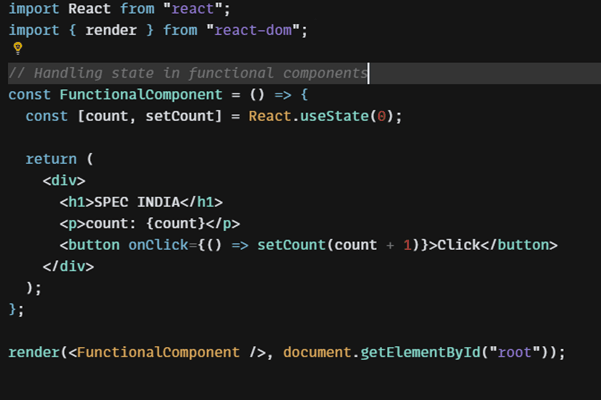
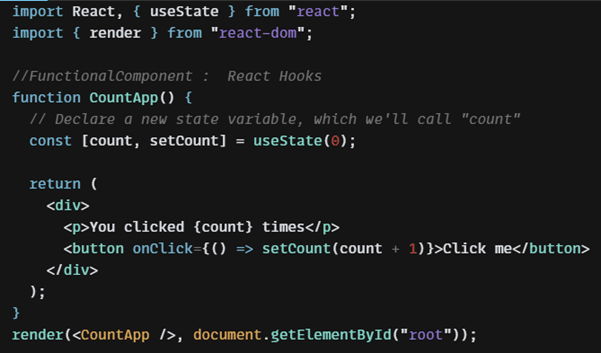
The basic counter-example below shows that the use state () Hook is used to handle the state in the function component. Here, the UseState Hook accepts the initial state, which can be any type supported by JavaScript, like strings, objects, and null. In our case, it is 0. Further, with the use of setCount() methods, on each click of the button, the counter would increase, and the component would return the number.
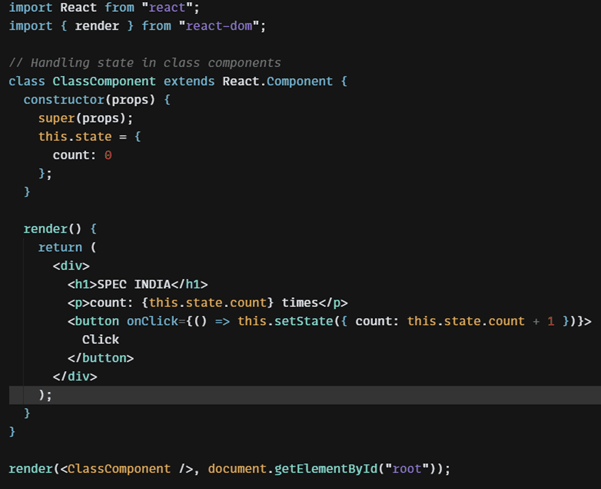
In the case of the Class component, the setState() function is used to execute similar logic. To begin with, a constructor is defined to create a state object with a state key and initial value (() here).
To update the count value, this.state.count is used in the setState() function of the render() method. Like the functional component, the class component would display the number of times a button was clicked, but the line of code is longer than the former.
React functional components are the winner vs. class components or the preferable React Component in case of handling state.
The React Components have a lifecycle during which they go through phases like Initialization, Mounting, Updating, and Unmounting. There are predefined methods that the React developers can use to invoke each of these phases. These methods enable the ReactJS geeks to manage the side effects.
As these lifecycle methods can only be written in class, there were no lifecycle methods in functional components until the introduction of Hooks.
If you’re familiar with React class lifecycle methods, you can think of useEffect Hook as componentDidMount, componentDidUpdate, and componentWillUnmount combined. – React
So, unlike different methods for each phase of the lifecycle in the React class component, for the functional component, you can use one Hook, use effect, to manage the side effects like fetching data or managing subscriptions.
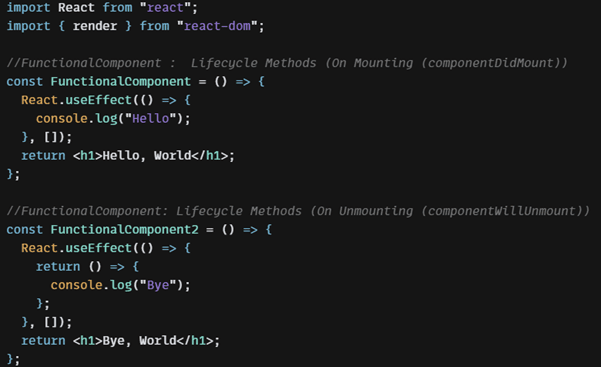
Here is the example of the mount and unmount lifecycle phase using effect Hook with an empty dependency array ([]) and a cleanup function, respectively.
Similarly, for componentDidUpdate, you must use effect Hook with a dependency array containing state/prop values to check for any update. In the functional component, for shouldComponentUpdate, there is React: memo or useMemo Hook. To update the state based on props (getDerivedStateFromProps) in the function component, useMemo or useEffect Hook.
To invoke the same phases of the lifecycle methods—mount and unmount—in a React class component, ReactJS developers have to use two separate methods: componentDidMount() and componentWillUnmount().
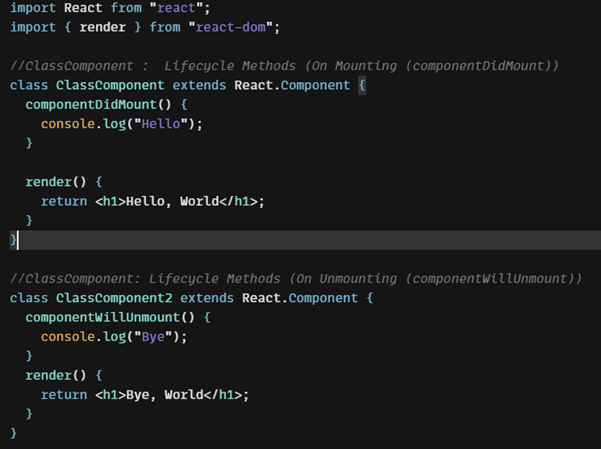
In the case of lifecycle methods, the Functional class in React leads in terms of Simplicity compared to class components.
Abbreviation of ‘Properties,’ props are read-only and immutable objects that store a value (objects, arrays, and functions). These arbitrary inputs are passed to the component via HTML attributes just as an argument in a function. The React component uses these objects to communicate/transfer data with each other.
Let us find out how these props are passed in each React component.
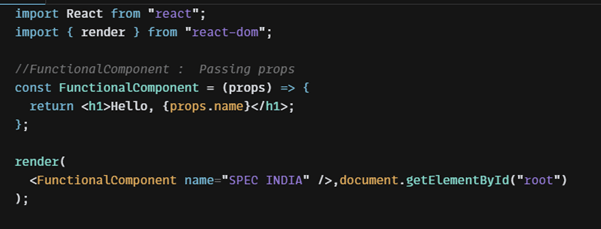
A prop is passed as an argument for the function in a functional component.
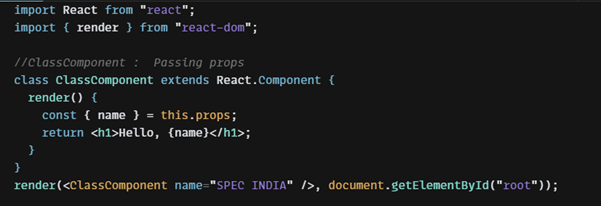
The props can be accessed via this keyword in the React class component since class components extend React. Component.
As it is easier to pass props in functional components with Hooks, for React class vs functional component, functional beats the class component.
One of the significant differences that enable Functional components in React to gain popularity over the class is that the React coders started assuming that class components are outdated and almost on the verge of removal. Even the official documentation of React mentions,” There are no plans to remove classes from React.”
Hooks are simple, backward-compatible JavaScript functions that enable functional components to use various React features, like state and lifecycle methods, previously available only in class components.
Here are some of the most essential React hooks:
Hooks can’t be used inside a class.
| Functional Components | Class Components |
|---|---|
| Extend from React. Component | Don’t extend from React. Component |
| Stateless components | Stateful components |
| Do not have any Lifecycle Methods; uses React hooks instead introduced in React in version 16.8 | Has different life cycle methods for invoking different phases of the component lifecycle |
| Fewer lines of code | Lengthier code lines |
| Don’t maintain state information | Maintains state information |
| Do not use any render method | Use render() method |
| Functional components eliminate the use of the “this” keyword | Class components use the “this” keyword |
| Don’t support a constructor | Require a constructor, as the state needs to be stored |
| Support React 16.8 Hooks | Don’t Support React 16.8 Hooks |
| Functional components are more efficient | Class components are a little inefficient |
| Uses React Hooks to manage state | It has built-in state management using this. state |
| Props are passed as a parameter to the function | Props are accessed through this. props |
| Help developers to use best practices | Easier to cause performance issues |
| React requires less work to render these components. | React requires more work to render these components. |
| Easier to read and test | More challenging to read and test |
| Uses less memory | Uses more memory |
| Supports inheritance design patterns | Promotes composition |
The developer can use the Class Component in the following scenario:
The developer can use the Functional Component in the following scenario:
With the introduction of React Hooks, the popularity of React functional components has grown tremendously, so much so that Class components have become obsolete. However, though functional components offer Simplicity and faster development, the Class component in React increases code reusability and features when developing high-quality front-ends. The unique aspect is the Error Boundaries exclusive to the class component.
Depending on the requirements, the ReactJs developers can choose either of these components.



SPEC INDIA is your trusted partner for AI-driven software solutions, with proven expertise in digital transformation and innovative technology services. We deliver secure, reliable, and high-quality IT solutions to clients worldwide. As an ISO/IEC 27001:2022 certified company, we follow the highest standards for data security and quality. Our team applies proven project management methods, flexible engagement models, and modern infrastructure to deliver outstanding results. With skilled professionals and years of experience, we turn ideas into impactful solutions that drive business growth.